This post is also available in: Español (Spanish) Português (Portuguese (Brazil))
In this article, I’ll show you how I merged my passion for Gothic calligraphy and branding to create a logo that later came to life on various surfaces using Illustrator mockup tools. This project highlights not only the handcrafted beauty of traditional calligraphy but also how it can be integrated into the digital world to enhance brands.
The Art of Gothic Calligraphy: Starting with Ink and Pen
Gothic calligraphy is one of the most distinctive writing styles. It uses angular strokes and a high contrast between thick and thin lines. For this project, I used my trusty calligraphy pen tilted at 45 degrees and walnut ink dissolved with coffee, which added a rich and organic texture to the strokes.
Materials Used:
Calligraphy pen tilted at 45 degrees.
Walnut ink dissolved in coffee for a brown tone.
Any paper for calligraphy.
The process begins with careful planning of the letters. Each stroke must be precise, as the final design depends on the clarity and proportion of the letters. This calligraphic style not only grabs attention for its aesthetics but also adds a touch of sophistication to any brand.
Vectorisation: From Manual to Digital
Once the calligraphic piece was ready, the next step was to digitise it and turn it into a logo. This process involved scanning the calligraphy work and using Illustrator tools to vectorise it.
Steps to Vectorise Calligraphy:
Scanning: I used a high-resolution scanner to capture every detail of the strokes.
Importing to Illustrator: I uploaded the image into Adobe Illustrator.
Using “Pen”: This tool was key to converting the ink strokes into editable vectors.The result was a vector logo with the same personality and texture as the original ink design, but fully adaptable to different scales and applications.
Branding: Designing with Purpose
Branding goes beyond a simple logo. It is the visual identity of a brand, and every element must convey its values and purpose. With the vectorised logo, I focused the design on a style that reflected elegance, classicism, and authenticity.
Applications of the Logo:
I used the logo in monochromatic tones to convey a sense of sophistication.
I adapted its size and proportion so it worked well on small items like business cards and larger applications like tote bags.
A good logo must be versatile and remain recognisable on any surface. This is where mockups come into play.
Illustrator Mockup Tools: Testing the Logo
With the logo ready, the next step was to test how it would look on various surfaces. For this, I used Illustrator mockup tools. Mockups allow you to visualise how a design applies to physical objects without actually producing them.
Process for Creating Mockups:
Using Mockup tool: object – Mockup, previous selected image and vector
Placing the Logo: I used the “Place” tool in Illustrator to insert the logo into the templates.
Adjusting Perspective: Using the “Warp” and “Transform” tools, I adjusted the logo to fit perfectly onto the object.
Textures and Shadows: I added shadows and textures to make the mockups look more realistic.
Surfaces Used:
Mugs and Coasters: Ideal for coffee shop or restaurant branding.
T-Shirts and Tote Bags: Perfect for personal branding or merchandise.
Mockups not only save time and money on physical tests but are also a key visual tool for presenting proposals to clients.


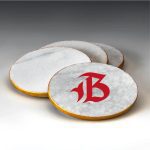
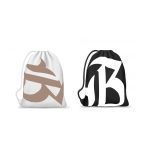
This project is a clear example of how traditional art and digital tools can merge to create impactful designs. Gothic calligraphy brings unique personality, while Illustrator and mockups take that design to the next level. Whether for branding, project presentations, or developing a complete visual identity, this process is an excellent way to explore creativity and stand out in the market.
If you want to learn more about how to apply these techniques to your projects, feel free to explore our guides and tutorials. Let art and design speak for your brand!


